Alerts
An alert is a message Nexus Telemetry Fleet sends when a terminal changes state. Alerts are set up per organisation under Alerts in the Organisation group of Settings. The Alerts page in the icon rail, also opened from an organisation’s actions menu on Organisations, lists every alert raised and the paused windows. Nothing is sent until a channel, email or webhook, is set up. Until a channel is set up and an alert has been raised, the page shows No alerts yet and Set up alerts instead.
Triggers
4 triggers decide when an alert is sent. Each is a tick box under Notify when a terminal….
| Tick box | Sent when |
|---|---|
| is offline | The terminal has been offline for 2 minutes, the confirmation period |
| is service restricted | Starlink is limiting the terminal’s service |
| has failed over to its backup connection | Traffic has moved to the backup connection |
| has recovered | The terminal leaves the offline, restricted or backup state |
Each box saves when ticked. A ticked trigger sends to every channel that is set up. A new organisation has all 4 ticked and no channel set up.
Repeat suppression
Once an alert has been queued, further alerts of the same kind for the same terminal are held for 15 minutes. A different kind, or a different terminal, is not held. Held repeats are recorded in the delivery log and not sent. Test alerts are never held. See Alert rules and webhook for the remaining rules.
In the Alerts section of Settings, press Set up on the Email row, or Edit once it is set up.
- Type an address in Send to and press Enter or comma.
- Repeat for up to 10 addresses.
- Press Save changes.
An address that is not valid is marked as it is typed. Turn email off clears the addresses. Each channel is saved on its own.
Webhook
In the same section, press Set up on the Webhook row. The fleet server sends one JSON post per alert.
| Field | Takes |
|---|---|
| Endpoint | The address every alert is posted to. It must be HTTPS. Plain HTTP is accepted only for a loopback address, and only on a fleet server with NF_ALLOW_PRIVATE_WEBHOOKS set. The fleet server expects a 2xx reply within 10 seconds |
| Signing secret (optional) | A secret the fleet server signs each post with. Generate makes one. It is shown once |
A stored secret is shown as Secret set, with Replace and Remove. Remove takes effect when the form is saved. Undo cancels the removal before the save. Turn webhook off clears the address and the secret.
See Alert rules and webhook for the post’s shape, its headers, and building a receiver.
Test alerts
- Set up at least one channel and save it.
- Press Send test alert on that channel’s row.
The fleet server sends queued alerts every 30 seconds. A test alert waits for the next send like a real one. Send test alert is greyed out until that channel is set up.
Alerts page
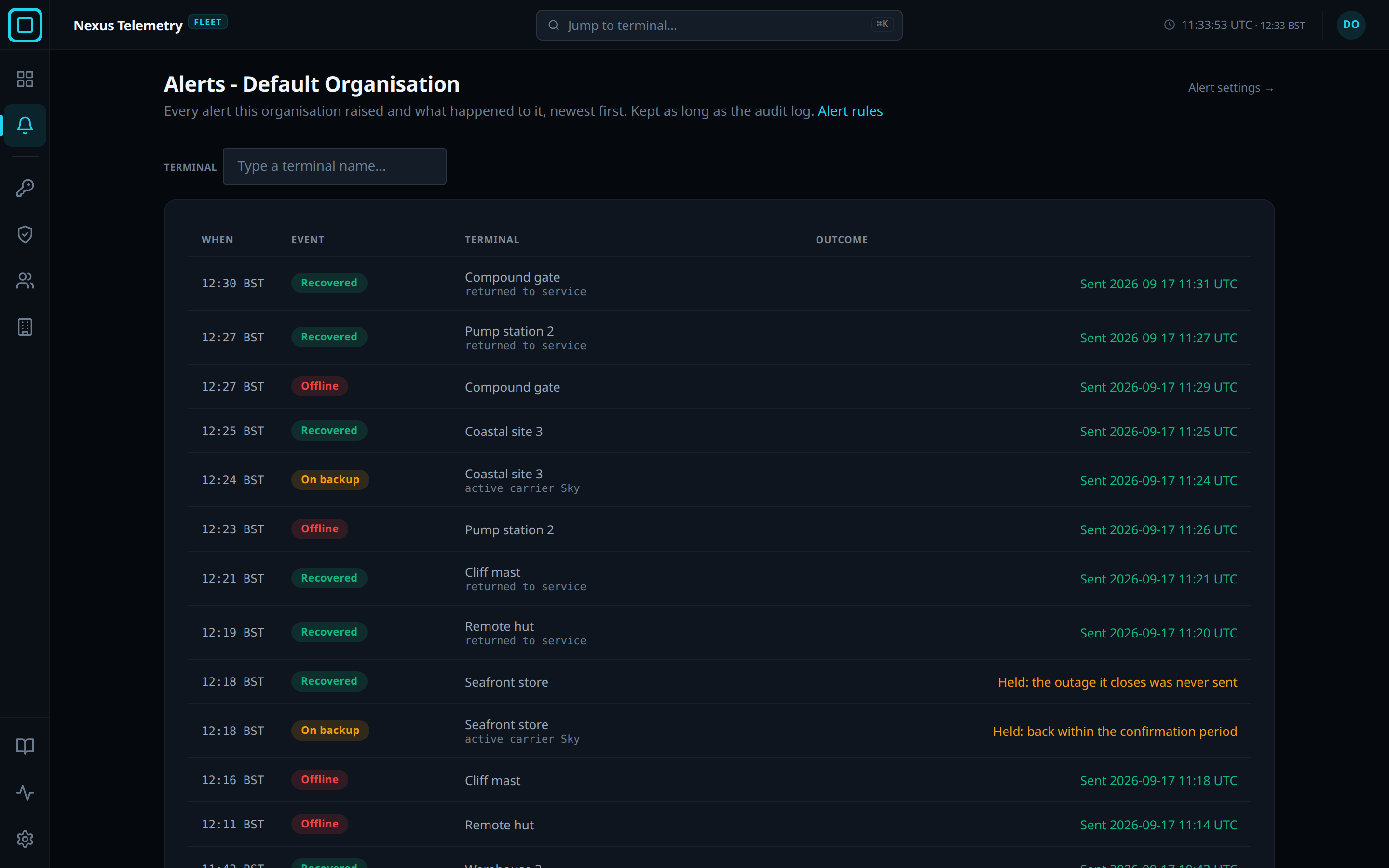
The Alerts page lists every alert the organisation has raised, newest first, with When, Event, Terminal and Outcome. Type a terminal name… narrows the rows. Older loads the previous page. The log is kept for as long as the audit trail, 90 days by default.
| Outcome | Meaning |
|---|---|
| Sent with a time | Every channel accepted the alert |
| Waiting to send | Queued for the next send |
| A count of attempts and an error | The fleet server is retrying. A retry of a real alert sends to every channel |
| Held: repeat within 15 minutes | Not sent, as a repeat |
| Held: back within the confirmation period | Not sent. The terminal recovered within the 2 minutes |
| Held: the outage it closes was never sent | Not sent. A recovery is sent only for an outage that was |
| Held: flapping notice sent instead | Not sent. The terminal had 4 or more state changes in 30 minutes and one flapping notice covers them |
| Held: terminal is flapping | Not sent. The terminal is still flapping and its changes are held until it has been stable for 30 minutes |
| Failed after 24 attempts with the error | Given up, for example no delivery channel configured |
Above the log, under Alerts currently paused, the page lists the open maintenance windows, with Scope, Status, Until, Reason and By, and End early or Cancel on each. See Maintenance windows. Alert rules on the page states the rules. See Alert rules and webhook.
Every change to the alert settings, test alerts included, is recorded in the organisation’s Audit trail.