Certificates page
The Certificates page lists every certificate in the organisations the signed-in user can see. The page opens on 3 tiles. Each tile summarises one part of the fleet’s certificates and opens a pane with the detail. See Certificates for what a device certificate, a CA certificate, a root key and signing cover are.
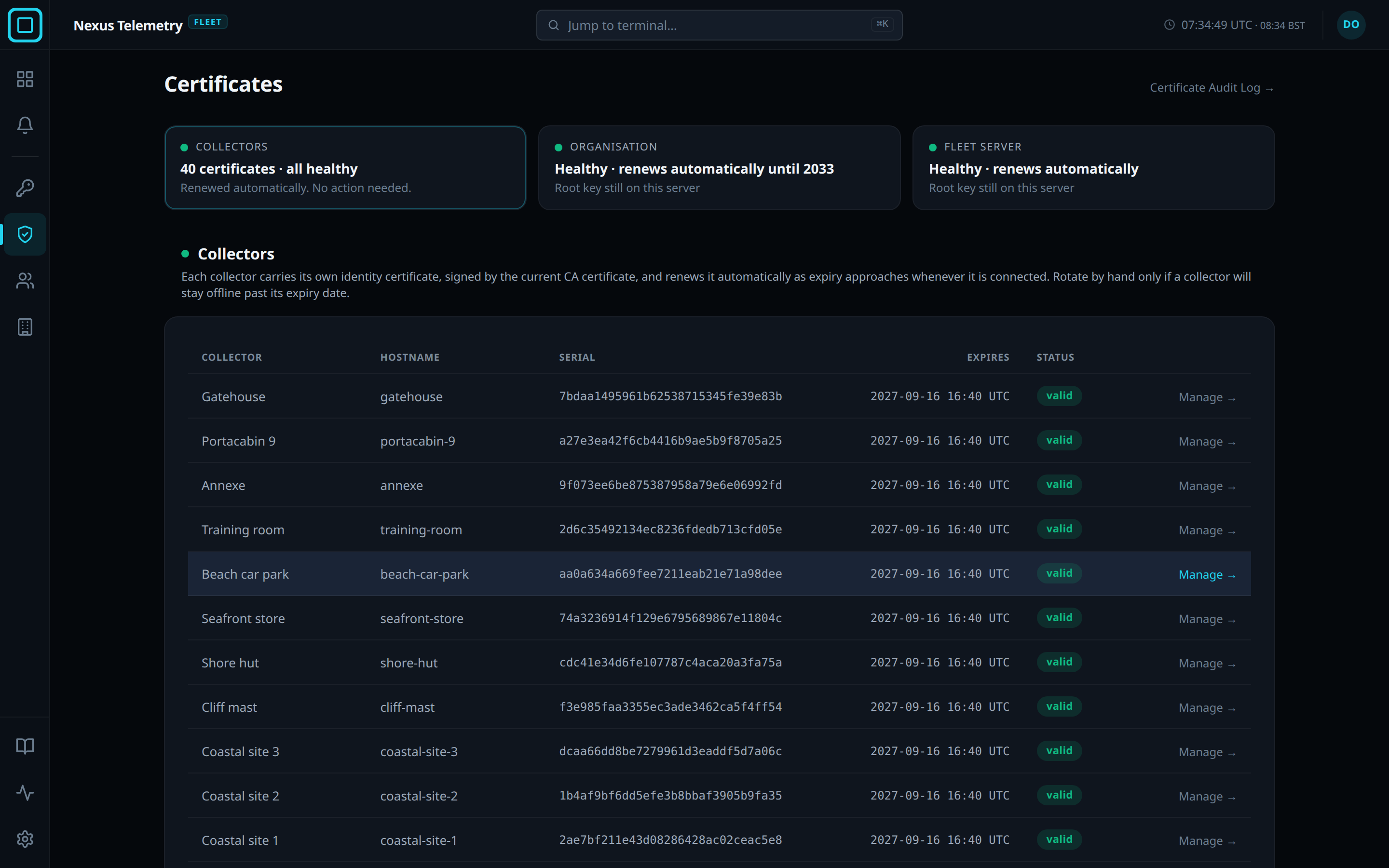
Tiles
Each tile has a health light and two lines. Green means no action is required. Certificate Audit Log → in the page header opens the audit view. The page refreshes every 30 seconds and after any button press.
| Tile | Covers | On a healthy fleet |
|---|---|---|
| Collectors | Every collector’s device certificate | The certificate count, all healthy, and Renewed automatically. No action needed. |
| Organisation | The organisation’s CA certificate and root key | Healthy · renews automatically until the year signing cover lasts to, and where the root key is kept |
| Fleet server | The fleet server’s own certificate and root key | Healthy · renews automatically |
Collectors pane
The pane is one row per collector: Collector, Hostname, Serial, Expires, Status, and Manage →. Manage → opens the Admin view of the terminal’s page in the dashboard, where the collector’s actions are. When the pane covers more than one organisation, an Organisation column comes first.
Status shows one of revoked, decommissioned, decommissioning, renewing, valid, expiring with the days left in brackets, expired or unknown. Where more than one applies, the first in that order is shown.
Amber chip and inline Rotate
A collector renews its own certificate in the 30 days before it expires, and its row reads renewing for those days whether it is online or not. A collector that is offline for those 30 days cannot renew. Its Status cell shows the amber chip offline · cannot self-renew, and the row offers Rotate beside Manage →. Once the expiry date passes, the row reads red expired and still offers Rotate.
Rotate queues a new certificate, which is delivered when the collector next connects. A collector whose certificate has expired cannot connect, so Rotate cannot reach it. See Retire and revoke for re-admitting it.
Organisation pane
| Card | Shows |
|---|---|
| CA certificate | Expires, as a date and the time left, and Fingerprint (SHA-256). Users with the Owner or Admin role also get Rotate, which promotes the next prepared CA certificate now. No collector goes offline, and the audit log records CA certificate promoted against the user who pressed it |
| Root key | A fingerprint, a state badge, Root expires, Queue covers to, and Recommended next step while the key is on the fleet server. See Root key |
While a CA rotation is in progress, the CA card shows the amber banner CA rotation in progress: N collectors not yet migrated to generation G. and a red Force-complete button. A CA rotation is not started from the dashboard. It completes on its own as collectors connect.
Warning: Force-complete revokes every collector that has not yet migrated. Each must then enrol again with a new token.
Fleet server pane
The Fleet server tile opens only for users with the Owner or Admin role in the platform organisation. For every other user it is a green tile reading Managed by your provider and No action needed.
| Card | Shows |
|---|---|
| Fleet Server Certificate | Expires, a Status badge with the expiry words of a device certificate, and Serial. Rotate replaces the certificate immediately, and no collector goes offline |
| Transport root key | The organisation’s root key card without Recommended next step, for the root key every collector uses to recognise the fleet server. Where a ceremony asks for the organisation’s slug to be typed, this key’s phrase is transport |
Audit view
The audit view lists the latest 50 certificate events, newest first.
| Column | Shows |
|---|---|
| Date | When the event happened |
| Collector | The collector, for a device certificate. fleet-server for every other certificate and key |
| Event | Issued, Renewal started, Rotation started, Renewed, CA certificate promoted, Rotation complete, Revoked, Removed, or a root key ceremony |
| Initiated By | The user, as organisation slug and username joined by a slash, or auto, system, stream or enrolment |
| Detail | The specifics of the event |
Revoke and decommission
A collector is revoked or decommissioned from the terminal’s Admin view, not from this page. See Retire and revoke. Afterwards the collector’s row here reads revoked, or decommissioning and then decommissioned once the collector confirms or the decommission timeout passes.
Roles
Every role can read this page and its audit view. Users with the Owner or Admin role can change the CA certificate, and in the platform organisation the Fleet Server Certificate and the transport root key. Users with the Operator role can run only the actions on a single collector. See Roles and permissions for the full matrix.